
Credit & reuse status
Visual published by engadget.com, shown for identification of the record. Publisher/source credit is inherited from the existing project asset ledger; individual creator and production permission require review. REFERENCE ONLY — NOT CLEARED FOR PRODUCTION. Full frame retained. Publisher image.
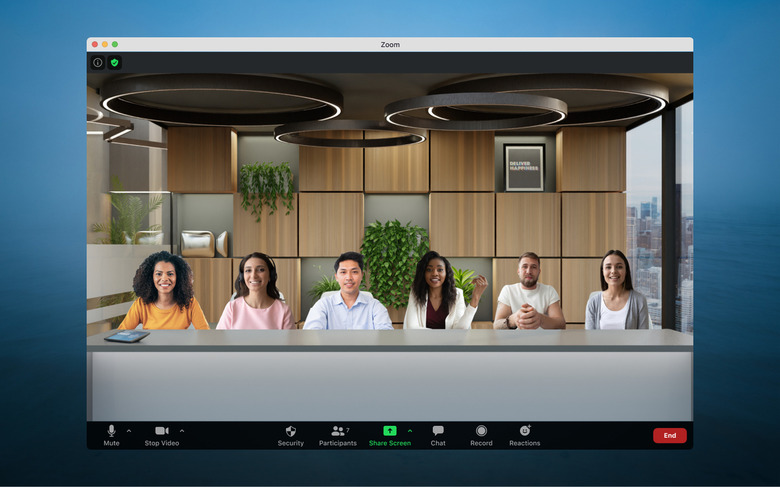
What Zoom's own documentation records
Zoom's support article on enabling immersive view for meetings and webinars, as retrieved on 16 September 2026, describes a feature that places up to 25 participants' video feeds onto a single chosen background, arranged automatically into predefined slots or positioned manually by the host. A companion article on using immersive view in meetings and webinars adds that hosts choose a scene, drag and resize individual video tiles within it, and can switch scenes mid-meeting. The feature is available on Basic, Pro, Business and Enterprise accounts and is enabled by default, with admins able to lock or restrict it at the account, group or user level. Neither document states when the feature launched or which client version introduced it; both are maintained as current reference pages rather than dated announcements.
Compositing, not a shared room
Immersive view is not telepresence in the sense of transmitting a real, navigable space; it is video compositing. Each participant's ordinary webcam feed is cropped and layered onto a flat or lightly shaped background image, the same basic operation a weather broadcast uses to place a presenter in front of a map. There is no shared depth, no parallax as a viewer's head moves, and no geometric model of a room that participants jointly inhabit; every viewer sees the same fixed composite. The virtual-background feature that improves the cropping is optional, and the documentation notes it works best when everyone present has it enabled, implying inconsistent cropping quality is a live possibility when some participants lack it.
What breaks it in practice
The setup article lists several concrete failure conditions rather than abstract caveats. Only local recording preserves the immersive scene; cloud recordings fall back to standard gallery or speaker layouts, so an archived version of a meeting may not look like what live attendees saw. Participants on unsupported clients appear in ordinary gallery or speaker view against black backgrounds rather than the shared scene. Anyone without virtual-background capability on their device appears inside a circular frame rather than blended into the scene. Mobile app users can take part but cannot start or control the feature, and screen sharing pauses the immersive layout entirely. Each of these is a documented client-side and workflow limitation, not a guess about likely behaviour.
- Will this specific meeting be recorded to the cloud, and if so, will the immersive layout survive in the archived copy?
- Does every participant have a supported client and virtual-background capability, or will some appear in black or circular frames?
- Is anyone planning to share their screen during the segment where the immersive scene matters?
Calling this a shared virtual room overstates what compositing does: it is a well-documented layout trick for video tiles, useful for the feel of a class or panel, but it carries none of the depth or parallax cues that separate an image from a place.
Sources & provenance
Preserved from the existing project research collection. These records were not independently re-researched as part of the design update. Supplier, historical and technical claims remain subject to editorial review; no hands-on test is implied.
Source publication: undated · Retrieved 2026-09-16
Zoom's current documentation describing what immersive view does, participant limits and account-level controls.
Source publication: undated · Retrieved 2026-09-16
Describes setup, scene selection, manual arrangement, and the specific recording, client and screen-share limitations.
Record: 0009-bf-084 · Rewrite revision: 2026-09-16.1 · Actual site publication: pending. No exact event date asserted.