
Begin with the light, not the label
A person appears to stand inside a display. A product turns in mid-air. A distant speaker seems to occupy the stage. All three might be described as a “hologram,” but the word alone tells you very little about how the image reaches your eyes.
Presence Atlas starts with a different question: where is the light coming from, and what happens to it on the way to the audience? The answer tells you what kind of content to prepare, where people can stand, and which parts of the room become part of the illusion. An optical trick can be a wonderful creative choice. It simply needs an accurate description.
Route 01 · Wavefront reconstruction
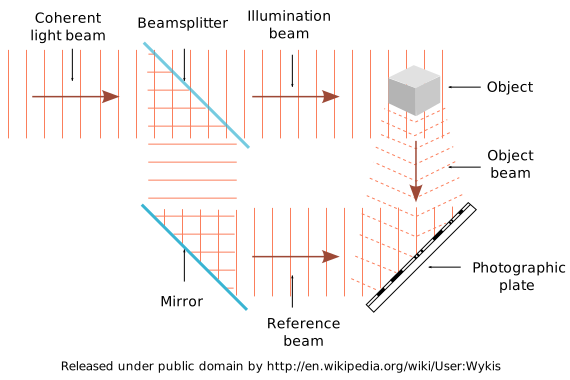
In holography, a recorded interference pattern can be illuminated to reconstruct a light wavefront. Dennis Gabor’s Nobel lecture describes the underlying recording and reconstruction principle. This is a specific optical process, not a synonym for every image that seems three-dimensional.
The useful distinction is between storing a flat picture and storing information that can reconstruct the light associated with a scene. When someone makes a holography claim, ask them to describe that process. You do not need to become an optical engineer to request a mechanism diagram.

Route 02 · Reflection and projection
Pepper’s Ghost uses a reflective surface and controlled staging to make a hidden subject or image appear within the visible scene. The audience’s position matters because the installation is arranging a view. Projection uses a surface that scatters light; that surface might be a screen, scenery, or a carefully controlled sheet of particles.
These methods belong on the same planning map, but they are not interchangeable. A reflective foil and a projection scrim do different jobs. Ask where each image is formed, what supports the surface, and which lighting conditions allow it to disappear. The historical engraving on our home page is a useful reminder that the room itself can be part of the apparatus.
Route 03 · Views and volumes
A multiview display directs different views toward different positions. A volumetric display forms luminous points across a physical volume. Both can produce spatial imagery, but neither should be classified as wavefront holography merely because the picture has depth. A research survey of 3D display technologies provides a starting taxonomy.
For a multiview demonstration, move sideways and notice where the view changes or breaks down. For a volumetric demonstration, ask how the content occupies the volume and how overlapping surfaces are represented. Those observations make better notes than “looks realistic,” which conceals the conditions under which you saw it.
Route 04 · Presence is an application
Telepresence describes an experience: bringing someone at a distance into a shared encounter. It does not specify a display mechanism. The image may arrive through a conventional screen, a transparent display, a reflected image, or a spatial system.
Separate the capture, network, display, and interaction layers. A compelling recorded presenter tells you little about the delay in a live conversation. A good camera view tells you little about how the effect reads from the back of the room. Keep those questions separate in the brief.
Put the mechanism in the brief
Write one sentence in ordinary language: “A recorded performer is reflected from a transparent surface toward an audience seated in this zone.” Then write what the audience should feel and what would make the installation fail. That gives the creative team and supplier a shared description to work from.
The map is an orientation tool, not a complete account of every optical design. Hybrid systems exist. Let the supplier explain the components and then use our display demonstration guide to inspect the whole experience.
Sources & context
Source links checked 15 September 2026. This guide combines the cited material with editorial planning suggestions. Examples are illustrative; they are not reported experiences or test results.